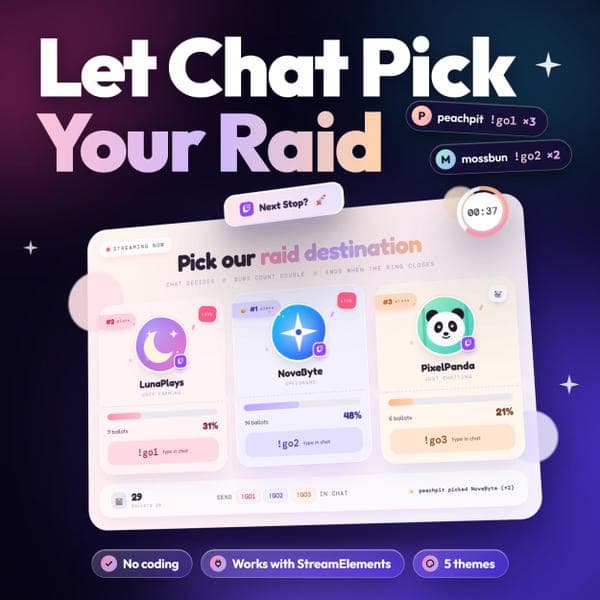
Ending your stream with a raid is the best way to look after your community. Next Stop makes picking the destination a live, fun moment on stream instead of a quiet decision.
HOW IT WORKS
- Click the one-click install link in your setup guide (PDF)
- Type up to four Twitch usernames into the settings panel
- Add the overlay to OBS as a Browser Source and type !raidpoll start when you are ready
WHAT YOU GET
- One-click install for StreamElements (no code to copy or paste)
- 14-page setup guide: install, OBS setup, every setting explained, chat commands and troubleshooting
FEATURES
- Chat voting with simple commands (!go1, !go2, !go3), all renameable
- 3 or 4 channel cards
- Avatar, display name and current game pulled from Twitch automatically
- LIVE badge when a channel is streaming
- Weighted votes: subscribers, VIPs and moderators count more (you set the weights)
- Countdown ring that flashes red in the last 5 seconds
- Winner highlight and winner banner (ties are settled at random)
- Mod chat controls: start, stop, reset, show, hide and change the timer
- 5 themes: Pastel Dream, Neon Night, Twitch Purple, Sunset Glow, Ocean Breeze
- Custom theme with your own colour pickers
- Change fonts, headline, wording and sizes, in any language
- Show or hide any part of the board
- Works in OBS as a Browser Source
PERFECT FOR
Twitch streamers who raid at the end of every stream, community streamers, team and co-stream nights, and anyone who wants chat to decide.
WHAT YOU NEED
- A Twitch channel
- A free StreamElements account
- OBS Studio or other streaming software with a Browser Source
GOOD TO KNOW
- This is a digital download. Nothing is shipped.
- Your install link is personal to your order. Please keep it private.
- Avatars, names and live status come from public Twitch data through third-party lookups. If one fails to load, you can enter a custom name and avatar instead.
- Not affiliated with, endorsed by or sponsored by Twitch or StreamElements.
 overlay